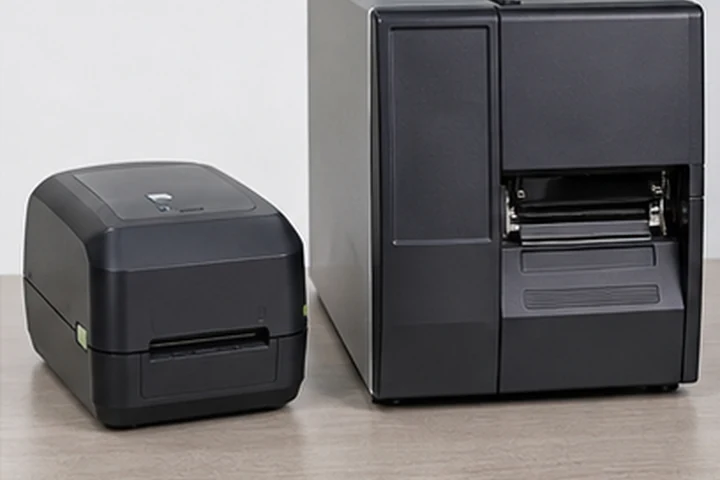
Quick answer
Choose a desktop printer for intermittent, local label production where compact size and simple operation matter. Choose an industrial printer for sustained shifts, larger media rolls, demanding environments and workflows where downtime is expensive. Daily label count is useful, but print concentration and operating conditions matter just as much.
Practical comparison
| Factor | Desktop printer | Industrial printer |
|---|---|---|
| Typical construction | Compact plastic enclosure | Metal or reinforced enclosure |
| Media capacity | Smaller rolls and ribbons | Larger rolls and longer ribbons |
| Work pattern | Intermittent batches | Repeated or sustained production |
| Footprint | Small counter or packing bench | Dedicated workstation or production line |
| Service access | Basic operator maintenance | Designed for faster media changes and replaceable components |
| Connectivity | USB, often Ethernet or wireless options | Broader wired, wireless and industrial integration options |
| Best fit | Small e-commerce, office, retail | Warehouse, manufacturing, distribution |
These are class-level tendencies, not promises for every model. Check the exact specification sheet.
Volume is more than labels per day
Five thousand labels spread across a full shift place a different load on a printer than five thousand labels required in one hour. Record peak labels per hour, average label length, print coverage, number of operators and whether the printer can cool between batches.
Larger industrial rolls reduce media changes. That advantage becomes important when a line stops while an operator replaces labels or ribbon. A desktop printer may still be economical for high daily totals if work is divided among stations and printed in short batches.
Environment and handling
Dust, temperature swings, forklift traffic and repeated lid opening favor a more robust enclosure. In a clean office or low-volume packing area, an industrial chassis may add cost without improving the result.
Also consider ergonomics. Operators need enough room to load media correctly, clean the printhead and see status indicators. A printer that technically fits on a shelf may be difficult to maintain there.
Features worth comparing
- Native print resolution and supported print width
- Maximum media diameter and ribbon length
- Tear, peel, cutter and rewind options
- Ethernet, Wi-Fi, Bluetooth, USB host and serial connections
- Printer languages supported by existing software
- Field-replaceable printhead and platen availability
- Remote management and alerting
- Local service and supply availability
A sensible selection method
Measure the current workflow for one week. Document peak demand, label dimensions, downtime and failed scans. Select a printer rated with comfortable headroom rather than operating continually at its limit. Before a fleet purchase, run the actual label, ribbon, template and software on one evaluation unit.
Frequently asked questions
How many labels per day makes a printer industrial?
There is no universal threshold. Manufacturers publish model-specific duty guidance, and peak concentration, label length and environment can be more important than the daily total.
Is an industrial printer more accurate?
Not automatically. Both classes can share the same resolution. Industrial models primarily improve capacity, durability, integration and sustained operation.
Can a desktop printer use large 8-inch rolls?
Some can use an external media holder, but the media path, dust protection and calibration must remain suitable. Confirm manufacturer support before relying on this setup.