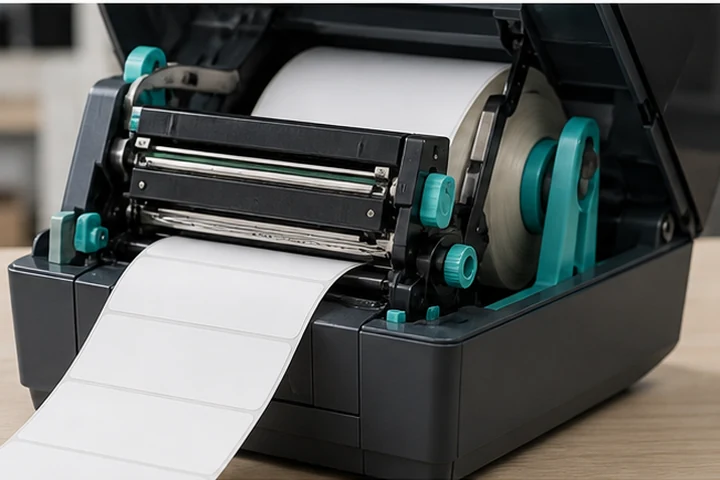
Quick answer
A thermal label printer forms an image by switching tiny heating elements in a printhead on and off as label material moves underneath it. In direct thermal printing, heat activates a chemical coating already present on the label. In thermal transfer printing, heat melts ink from a ribbon onto the label surface. Neither method uses liquid ink or toner.
The four parts involved in every print
| Part | What it does | What can go wrong |
|---|---|---|
| Printhead | Produces a line of controlled heat dots | Dirt or wear creates white lines and missing bars |
| Platen roller | Moves the label and presses it against the printhead | Debris or wear causes uneven feeding and print density |
| Media sensor | Detects gaps, marks or notches between labels | Poor calibration causes skipped labels or printing between labels |
| Controller and driver | Converts the label design into printer commands | Wrong dimensions or resolution distort text and barcodes |
The printhead is a fixed row of dots. A 203 dpi head has 203 dots per inch; a 300 dpi or 600 dpi head places more dots in the same space. As the platen roller advances the media, the printer energizes selected dots for each row of the image.
Direct thermal process
Direct thermal labels contain a heat-sensitive coating. The coating turns dark where the printhead applies heat, so the printer needs only the label roll. This makes media loading simple and removes ribbon inventory from the workflow.
The trade-off is environmental sensitivity. Heat, ultraviolet light, friction, some plasticizers and certain chemicals can darken or fade the image. Direct thermal is therefore best for shipping labels, receipts, visitor badges and other labels whose useful life is measured in days or months rather than years.
Thermal transfer process
Thermal transfer printing places a ribbon between the printhead and label. Heat releases wax, wax-resin or resin ink from the ribbon carrier and bonds it to the label. The ribbon and label must be compatible: a general-purpose wax ribbon normally suits paper, while durable synthetic labels often require wax-resin or resin.
This method adds a consumable and an extra loading step, but it supports a wider range of materials and generally provides better resistance to abrasion, moisture, heat and chemicals.
What happens from click to finished label
- Label software sends text, barcode and graphic instructions through a printer driver or printer language.
- The printer checks its media and ribbon sensors and feeds to the next label start position.
- The controller converts the design into rows of dots at the printer's native resolution.
- The printhead heats selected dots while the platen advances the label.
- The printer stops at the tear, peel or cut position specified by its settings.
Why calibration and testing matter
The printer does not automatically know every label's length, gap, black mark or liner behavior. Calibrate after changing media type or when the printer starts skipping labels. Use the lowest darkness setting and highest speed that still produce a verified, readable barcode. Excessive heat can spread bars, wrinkle ribbon and shorten printhead life.
Frequently asked questions
Do thermal printers need ink?
No. Direct thermal printers use heat-sensitive media, while thermal transfer printers use a coated ribbon. Neither uses ink cartridges or toner.
Can one printer use both methods?
Many thermal transfer printers can also run in direct thermal mode, but direct-thermal-only printers do not have the ribbon hardware required for transfer printing. Confirm the exact model specification.
Why does a thermal label turn black when scratched?
Friction creates heat. If a quick fingernail scratch leaves a dark mark, the material is usually direct thermal media.